 Detune
How Does a Synthesizer Work?
A synth makes a tone with an oscillator, shapes its brightness with a filter and its volume with an envelope. Three controls, and three sounds built from them.
A synthesizer makes a raw tone with an oscillator, shapes its brightness with a filter, and controls its volume over time with an envelope. Everything else on the panel, the LFOs, the modulation, the effects, moves one of those three things for you. By the end of this page you will be able to open any synth, on a stage, in a plugin or on a phone, find those three controls, and build a pluck, a pad and a bass from the same starting point.
The short answer
Sound leaves the oscillator, passes through the filter, and reaches your speakers through an amplifier whose level the envelope sets. That order is fixed on almost every synth ever made, and once you know it the panel stops being a wall of knobs and becomes three sections in a row.
The oscillator decides the raw character of the tone: bright or dull, buzzy or smooth. The filter takes brightness away, and how much it takes away is the single control you will turn most. The envelope decides whether a note snaps in and dies away like a plucked string or swells in and hangs like a bowed one. Native Instruments’ explainer on subtractive synthesis puts the whole design in one sentence: “A subtractive synthesizer works by generating an audio signal and then shaping it in various ways.”
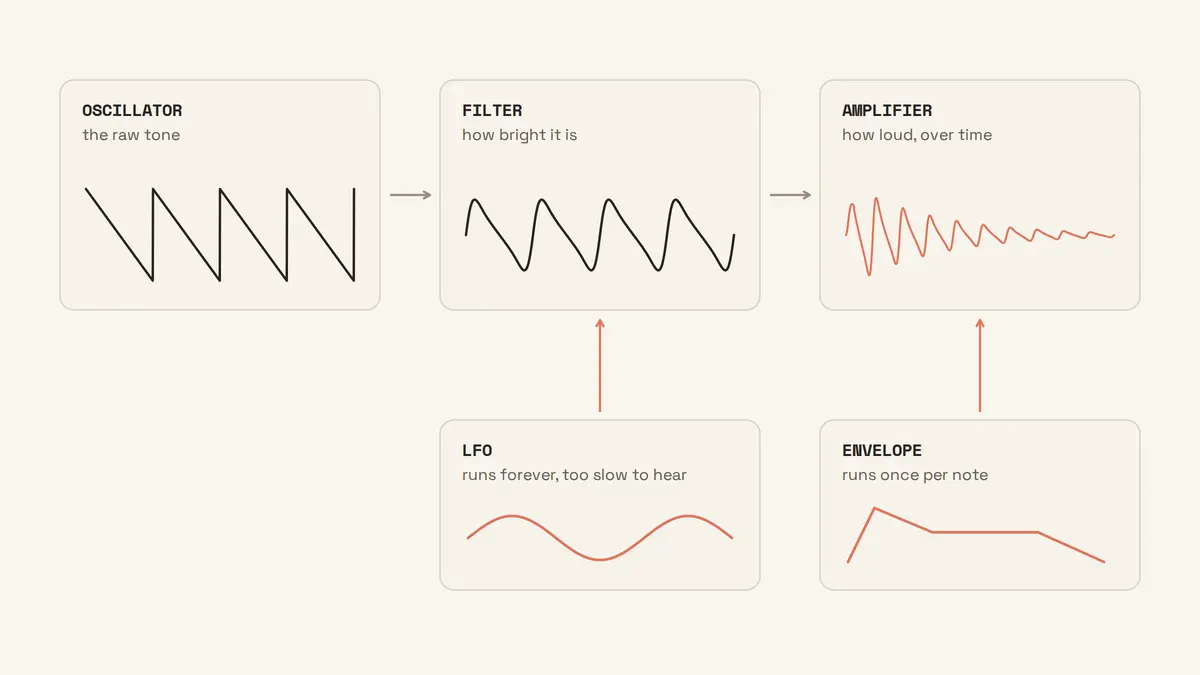
The word for this is subtractive synthesis. Gordon Reid, opening Sound On Sound’s 63-part Synth Secrets series in May 1999, explains the name: it “is derived from the method itself, wherein you attenuate or remove harmonics from harmonically rich waveforms to create new sounds.” Start with too much, and carve.
The oscillator: where the sound starts
The oscillator produces a waveform that repeats hundreds of times a second, and the shape of that waveform is what you hear as the tone’s character. Pick a different shape and the same note sounds like a different instrument before you touch anything else.
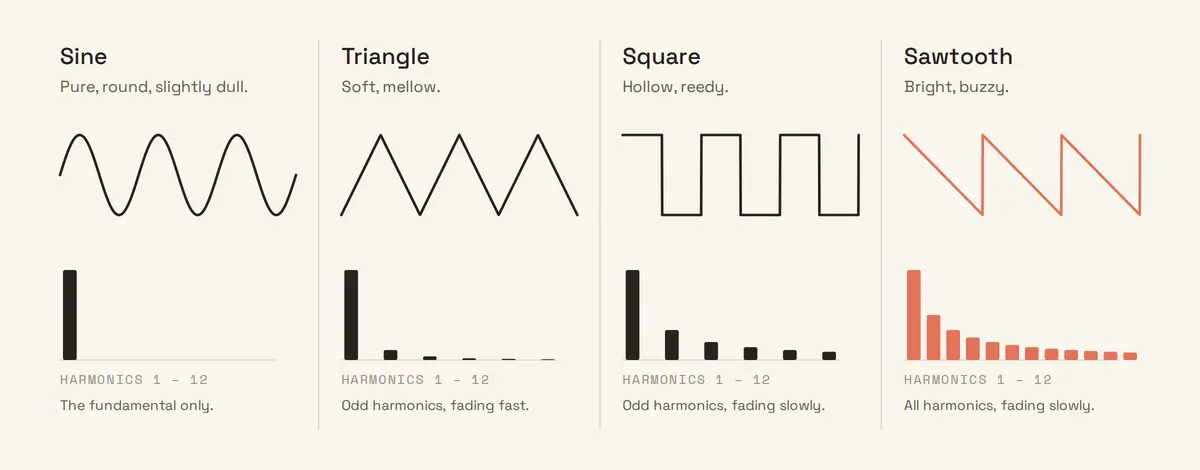
Four shapes cover most synths, and each has a sound you can learn to name in a week:
- Sine. One frequency and nothing else. Pure, round, and slightly dull, because there is nothing above the note for a filter to work on. Sub-bass is usually a sine.
- Triangle. A sine with a little edge. Native Instruments calls it “the most mellow” of the four and “your best option for creating gentle, smooth sounds.”
- Square. Hollow and reedy. Ableton’s Learning Synths reports that “people often describe square waves as ‘woody’ or ‘hollow’”. A clarinet is the nearest acoustic sound.
- Sawtooth. The bright one. The same page: “buzzy” or “bright”. Every harmonic is present, which is why it is the default on most synths: there is the most to filter.
Reid gives the reason the shapes sound different, and it is the one idea underneath everything else on this page: “the natures of musical tones are defined by the numbers and amplitudes of the harmonics contained within them, and any given set of harmonics gives us a given waveform.” A sawtooth wave contains every harmonic, each quieter than the last. A square wave skips every second one, which is where the hollowness comes from. A sine has none at all.
Most synths give you two or three oscillators so you can stack shapes, tune one an octave down for weight, or detune two against each other for width. Start with one.
The filter: how bright it is
The filter removes harmonics above a point you choose, called the cutoff, and the lower you set that point the darker the sound gets. It is the most useful control on any synth, and if you only ever learn one knob, learn this one.
The standard type is the low-pass filter. Reid’s definition, from Synth Secrets part 4: it “passes unhindered all the frequencies below a ‘cutoff’ frequency while attenuating all those above it.” Moog’s Werkstatt manual describes what that feels like under your hand: “Turning the knob to the right will open the filter, allowing more harmonic content to be heard, creating a brighter sound. Turning the knob to the left will close the filter, causing more harmonic content to be filtered, creating a darker sound.”
Try it. Choose a sawtooth, hold a note, and sweep the cutoff from fully open to fully closed. At the top it buzzes. Halfway it sounds like the same instrument heard through a wall. Near the bottom only the fundamental is left, and a sawtooth has turned into something close to a sine. That sweep is the sound of the filter, and you have heard it on thousands of records.
The second control is resonance. It boosts the harmonics right at the cutoff point, so the edge of the filter becomes audible as a peak. Reid, in part 6: “the filter still attenuates the frequencies far above the cutoff frequency, but a band around the cutoff is boosted.” Sweep the cutoff with the resonance up and you get what he calls “perhaps, the most recognisable and desirable of all analogue synthesizer sounds.” Learning Synths describes the top of the range: “high resonance values create a kind of high ‘whistling’ sound.” A little resonance gives the filter a voice. A lot makes it scream.
The envelope: how it starts and stops
The envelope is a shape the synth draws every time you play a note, and the volume follows it. Four numbers describe the shape: attack, decay, sustain and release, or ADSR.
Attack is how long the note takes to reach full volume after you press the key. Decay is how long it takes to fall from that peak to the sustain level. Sustain is the level it holds while the key stays down; it is the only one of the four that is a level, not a time. Release is how long the note takes to fade after you let go. Reid’s summary: “The Attack time determines how percussive a sound is, and the Decay determines how long the sound takes to fall to the Sustain level after the initial accent. After that, the Release controls the time it takes for the note to die away when you release the key.”
Two settings show what the attack does. Take a sawtooth with the filter half open. Set attack to 0 ms, and the note starts the instant you touch the key, like a plucked string. Set attack to 400 ms and the same note fades in over almost half a second, like a bowed one. Nothing about the tone changed. Only its beginning did, and it sounds like a different instrument.
Sustain is the one beginners set wrong. With sustain at full, decay does nothing, because there is nowhere to decay to. Learning Synths says the same: “With sustain all the way up, decay has no effect.” If you want a note to die away while you hold the key, sustain has to come down.
Most synths have a second envelope wired to the filter cutoff rather than the volume. That is what makes a sound open up and close again over each note, and it is how a pluck gets its snap.
The LFO and modulation: how it moves
An LFO is an oscillator too slow to hear, and instead of being listened to it turns a knob for you. Route it to pitch and you get vibrato. Route it to the cutoff and the brightness pulses. Route it to volume and you get tremolo.
The general word is modulation: one part of the synth controlling another. The envelope is a modulator that runs once per note; the LFO is a modulator that runs forever. Learning Synths explains that “you don’t hear the envelope directly — the synth uses the envelope’s shape to determine how one or more other aspects of the sound change over time. This process of using some part of the synthesizer to affect other parts is called modulation.”
Reid’s part 3 sorts every module on a synth into three kinds, and it is a useful way to read any panel: generators make the tone, modifiers change it, and controllers direct the modifiers. The oscillator is a generator. The filter and the amplifier are modifiers. The envelope and the LFO are controllers. Everything on a synth, however many knobs it has, is one of the three.
Putting it together: three sounds from the same three controls
Start every one of these from the same place: one sawtooth oscillator, low-pass filter, cutoff about a third of the way up, resonance low. Then change only the envelopes.
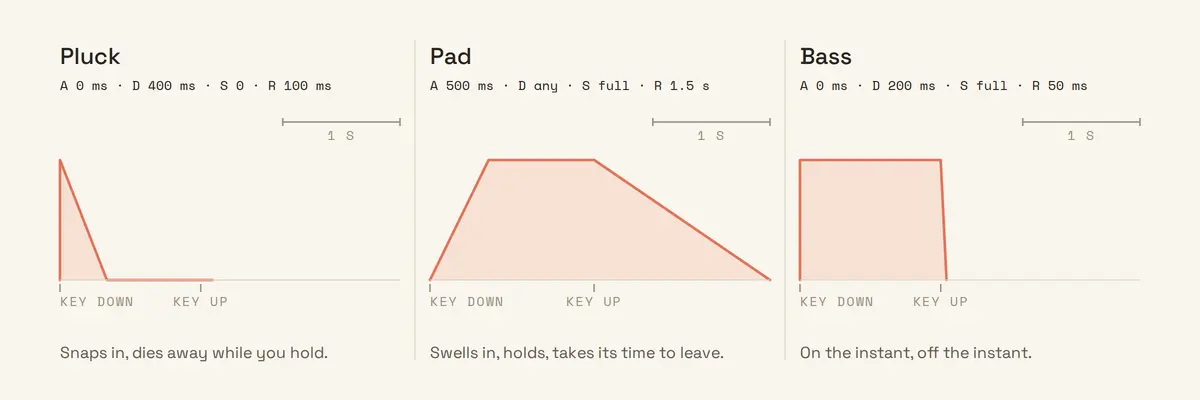
A pluck. Amp envelope: attack 0 ms, decay 400 ms, sustain 0, release 100 ms. Filter envelope: the same shape, with its amount turned up so the cutoff opens on the attack and closes as the note decays. The note snaps in bright and darkens as it dies, which is what a plucked string does. Native Instruments’ ADSR guide builds the same sound in Massive X with “a short Attack (17ms), medium Decay (around 600ms), and minimum Sustain.” Ableton’s Learning Synths Plucked bass recipe describes the mechanism: “The ‘plucked’ character of this sound is caused by a filter modulated by an envelope. This causes the filter to quickly open and then quickly close again.”
A pad. Amp envelope: attack 500 ms, decay anything, sustain full, release 1.5 s. Filter envelope amount down to nothing, cutoff opened a little further. Same oscillator, same filter, and now the sound swells in, holds as long as you hold the chord, and takes a second and a half to leave. Native Instruments’ version: “longer Attack (500ms), Decay (5 seconds) and Release (9 seconds), and maximum Sustain.”
A bass. Amp envelope: attack 0 ms, decay 200 ms, sustain full, release 50 ms. Cutoff low, so only the bottom harmonics survive, and a touch of resonance to give the edge some bite. Play it an octave down. If your synth has a second oscillator, add a sine one octave below the sawtooth and the bottom fills in without the top getting any brighter. Learning Synths’ Subbass recipe does a version of this with a square and a saw and “the Pitch Offset down to -12 (one octave).”
Three sounds, one oscillator, one filter, and the only thing that moved between them was the shape of the envelope. Build all three tonight and you will have learned more than a month of preset scrolling teaches.
Why every synth looks different and works the same
The panel changes; the signal path does not. A 1970s Moog, a Serum window and a synth on a phone are all oscillator, filter, amplifier, with envelopes and LFOs alongside, and the reason they look different is mostly how many of each they have and where the designer put them.
Moog’s manual states the principle for hardware: “The oscillators, filters, and envelopes, etc. are each self-contained modules. By design, these modules are wired together using both audio signals and control signals.” Software synths draw the same modules as panels on a screen. The current Wikipedia article lists the components in the same order: oscillators, filters, envelopes, low-frequency oscillators.
So when you open a synth you have never seen, look for the section with waveform names on it. That is the oscillator. Look for the knob labelled cutoff or frequency, usually with resonance next to it. That is the filter. Look for four sliders or a drawn curve marked A, D, S, R. That is the envelope. Find those three and you can already play the instrument. Everything you have not found yet is a modulator, and it will be pointed at one of the three.
Common questions
What’s the difference between a keyboard and a synthesizer?
A keyboard plays sounds someone else made; a synthesizer lets you make the sound. Yamaha’s guide to keyboard instruments draws the line at editing: “where the synthesizer excels is in the creation of brand new sounds — either by making them from scratch or by ‘editing’ the existing on-board sounds.” Many synthesizers have keys, and many keyboards contain a synth engine with the controls hidden, so the distinction is about access to the oscillator, filter and envelope, not about the shape of the box.
Is it hard to play a synthesizer?
Playing one is as hard as playing whatever keyboard is attached to it. Programming one is a separate skill, and it is smaller than it looks: three controls, learned in order. The most upvoted reply when a guitarist asked for an explanation in December 2025 was “You press the button and the device makes sounds; if you turn the knobs, the device makes different sounds when you press the button. The rest is magic.” The next reply down pointed at Ableton’s Learning Synths, and that pairing is about right: it is not hard, and there is a good free place to start.
Do you need a computer to play a synthesizer?
No. A hardware synth makes sound on its own; a software synth needs a computer or a phone to run in. Learning Synths puts it this way: synthesizers “can be physical instruments that musicians play on stage, noise-makers inside electronic devices and toys, or software running on a phone or computer.” What does need something else is a MIDI controller, the keyboard-shaped object with no sound of its own. Sweetwater’s buying guide is careful about the distinction: “Most keyboard controllers themselves have no internal sound-generating capability.”
Can you play a synth like a piano?
You can, and many synths ship with piano-style weighted keys for exactly that. Yamaha’s guide to choosing a keyboard notes that a synth action “is like an organ’s — there’s little resistance and the keys can be played very quickly”, and recommends a weighted keybed to anyone “accustomed to the feel of an acoustic piano.” The one thing to check is polyphony: a monophonic synth plays one note at a time, so chords need a polyphonic one.
Where to turn the knobs
Reading about the filter is not the same as sweeping it. Open a synth tonight, a free one is fine, start from a single sawtooth, and build the three sounds above. Then try the arpeggiator, which is the next control along.
Detune teaches the same three controls: waveforms first, then the volume envelope, then the filter, each one a short lesson on a live synth where you turn the control and hear the change. The app is free to download.