 Detune
Synth Sound Design
Sound design is four moves in order: waveform, filter, envelope, modulation. A method for any synth, three sounds built with it, and how to practise.
Sound design is four moves in order: pick a waveform, shape it with the filter, set how it starts and stops with the envelope, then add movement with an LFO. Learn those on one synth and they transfer to every other. By the end of this page you will have a method you can repeat on Vital, Serum, Alchemy or a hardware synth, three sounds built with it, and a way to practise that trains the ear rather than the memory.
If the words oscillator, filter and envelope are new, read How Does a Synthesizer Work first. This page assumes you know what they are and shows you how to use them.
The short answer: the four moves
Every synth sound you have ever heard was made by choosing a raw tone, deciding how bright it is, deciding how it starts and stops, and deciding what moves while it plays. Do those four things in that order, every time, and you have a method instead of a habit of turning knobs until something happens.
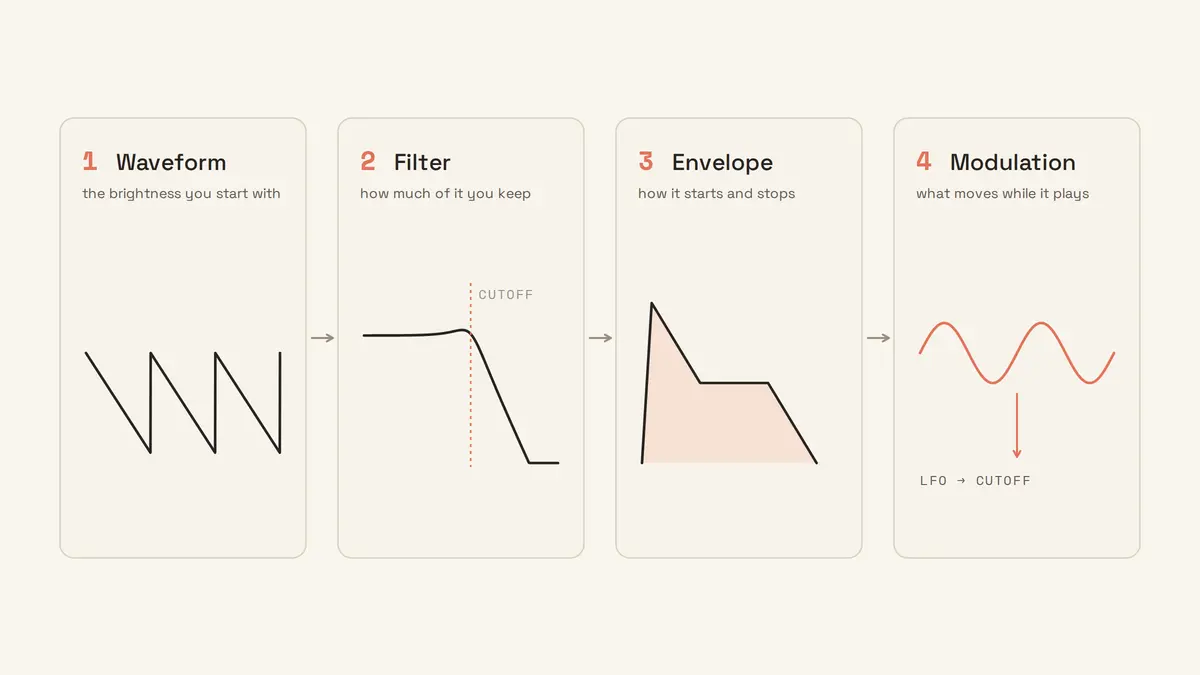
The order matters because each move depends on the one before. You cannot judge a filter setting on a waveform you have not chosen. You cannot hear what an envelope is doing to the brightness if the filter is wide open. You cannot tell whether an LFO is helping if the underlying sound is not finished. Beginners who skip ahead to modulation, or start from a preset with all four already set, are trying to change one thing while three others they did not choose are also changing.
Start from init, not from a preset
Begin every sound from the synth’s init patch: one oscillator, filter fully open, a plain envelope, no modulation, no effects. It is the advice that comes up most in the guides and threads linked on this page, and the one beginners skip because a preset already sounds good.
Computer Music’s 20 synthesis tips explains why: “If you want to design your own sounds from scratch, starting from a complex preset may well make doing so more difficult than it needs to be.” Their fix, if your synth has no init: “dial in a single sawtooth oscillator, open the filter right up, create a basic amplitude envelope, and disable/turn down all modulation and effects.” Sweetwater’s Daniel Fisher gives the same reason from the other direction: “Starting from anything more than a blank slate causes trouble as I get further into a patch. It’s always best to know that any parameters I haven’t used are completely available to me, and that there are no unknown connections that will wreck the sound if I dismantle them.”
Producers say it too. When someone who had owned a DeepMind 12 for five years asked how to stop relying on its presets, the advice was to learn what the subtractive controls do, “then either experiment from init presets or take sounds you like and try to recreate them. Practice is the only way. There are no easy shortcuts.” Another reply gives a gentler ramp: “Tweak something, listen, after a few sessions initialize a preset and make your own.”
A preset is not a bad thing. It is someone else’s four moves, already made. The problem is only that you cannot change one usefully until you can hear which move produced which part of the sound, and the fastest way to learn that is to make the moves yourself, from nothing, many times.
Move one: the oscillator
Choose the waveform by how much brightness you will want later, because the filter can only take brightness away. A sawtooth gives you everything to carve. A square gives you a hollow tone. A triangle or sine gives you something soft that no filter will make bright.
For your first hundred sounds, use a single oscillator and only the basic shapes. One reply to a beginner lost in Vital says exactly this: “if you’re totally new to synthesis you should stick to basic waveforms, envelopes and filters and you should stay away from wave tables and frequency modulations.” The wavetable and FM menus will still be there when you can hear what a sawtooth does through a half-closed filter.
Add a second oscillator only for a reason you can name: a sine an octave below for weight, or a second sawtooth detuned a few cents for width. If you cannot say what the second oscillator is for, you do not need it yet.
Move two: the filter
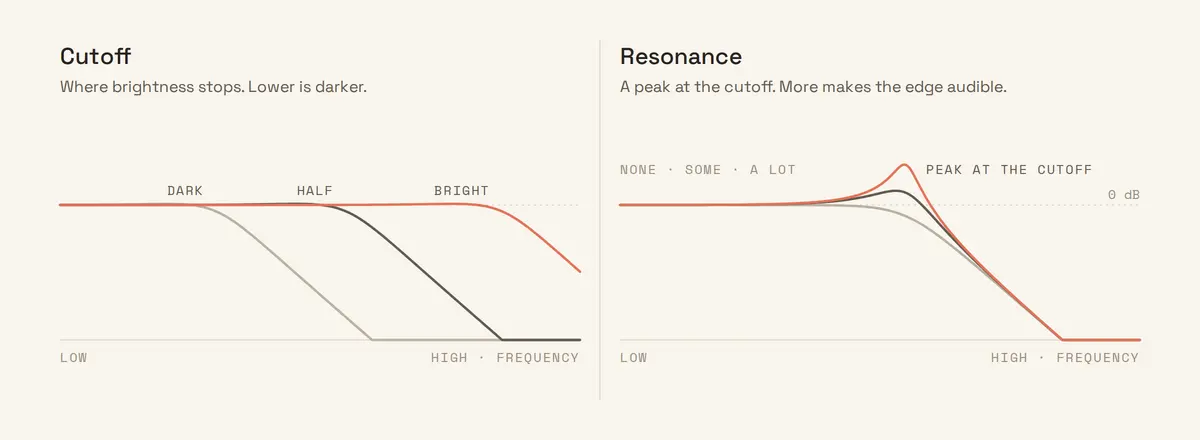
Set the cutoff to the darkest the sound should ever be, then decide whether it needs an edge. The low-pass cutoff decides brightness; resonance decides whether the point where brightness stops is audible as a peak.
Sweep the cutoff while holding a note, all the way down and back up, before you set it. You are listening for the point where the sound stops being buzzy and starts being tone, and that point is different for every waveform and every register. A bass wants the cutoff low, so only the fundamental and a couple of harmonics survive. A lead wants it higher. A pad usually sits in between, with room for the envelope to move it.
Resonance is a choice, not a default. At zero the filter is invisible; you hear less brightness and nothing else. Turn it up and the harmonics at the cutoff are boosted, so when the cutoff moves you hear it move. That is the sound of almost every filter sweep on a record. Turn it up far enough and the filter whistles at its own pitch. Use a little for a bass with bite, more for a lead that should sound like the filter is part of the instrument, none for a pad that should not draw attention to itself.
Move three: the envelope
Set the amp envelope for how the note should start and stop, then set the filter envelope for how its brightness should change over the note. Two envelopes, two jobs.
The amp envelope is the shape of the note’s volume. Attack 0 and it snaps; attack 300 ms and it swells. Sustain at full and it holds while the key is down; sustain at zero and it dies away whether you hold or not. Release is how long it lingers. Splice’s synthesizer basics gives the two extremes: “If you have a slow attack, decay, sustain, and release, you’ll create a pad-like sound. Meanwhile, if you tighten up the attack, decay, sustain, and release, it’ll start to sound more like a pluck.”
The filter envelope is where the character lives. Set its amount to zero and the brightness is static. Set it to half, with a fast attack and a medium decay, and every note opens bright and closes dark, which is the shape of almost everything percussive a synth does. Set the attack slow instead and the note gets brighter as it goes, which is the shape of a pad that blooms.
Move four: modulation
Add an LFO last, and only to one destination at a time. Route it to the cutoff for a pulsing brightness, to pitch for vibrato, to volume for tremolo. Set the rate slow enough to hear as movement and the depth small enough that the sound is still recognisably the one you built.
The LFO is a knob-turner. One reply puts it as well as any manual: “An envelope or an LFO is a little robot that moves a knob for you over time.” Once you think of it that way the modulation matrix on a bigger synth stops being intimidating, because every row in it is one robot, one knob, one amount.
If the sound was finished after move three, skip this one. Plenty of good sounds have no LFO on them at all.
Three sounds, built in front of you
All three start from init with one sawtooth, low-pass filter, resonance at zero. Only the settings below change.
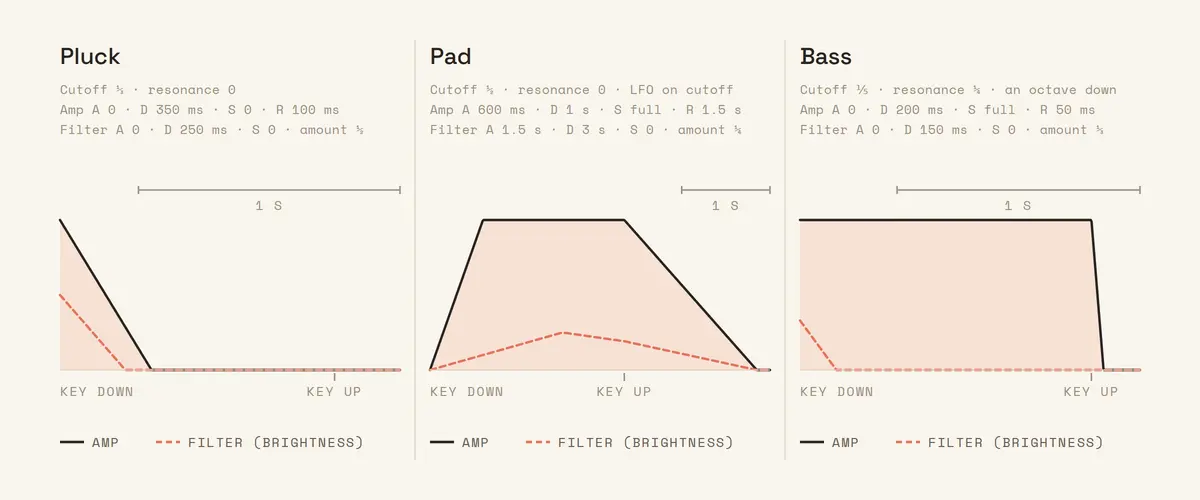
Pluck. Cutoff a third of the way up. Amp envelope: attack 0, decay 350 ms, sustain 0, release 100 ms. Filter envelope: attack 0, decay 250 ms, sustain 0, amount about half. No LFO. The note opens bright and closes dark before your finger leaves the key. Attack Magazine’s techno stab recipe in Hive is the same idea with a square wave: amp attack 0, sustain 0, and a filter envelope with a short decay.
Pad. Cutoff halfway. Amp envelope: attack 600 ms, decay 1 s, sustain full, release 1.5 s. Filter envelope: attack 1.5 s, decay 3 s, sustain 0, amount a quarter, so the chord gets brighter over the first second and a half and settles. LFO on the cutoff, rate slow, depth small, so the brightness breathes. Add the second sawtooth, detuned slightly, if the synth has one. Native Instruments builds a pad with almost the same numbers: “a slow Attack (of around 800ms) and a long decay (4 seconds). Sustain should be at maximum.”
Bass. Cutoff low, a fifth of the way up. Resonance a quarter. Amp envelope: attack 0, decay 200 ms, sustain full, release 50 ms. Filter envelope: attack 0, decay 150 ms, sustain 0, amount a third, for a click of brightness on each note. Play an octave below the pluck. If the synth has a second oscillator, a sine an octave lower under the sawtooth fills the bottom without adding brightness. Attack Magazine’s garage bass sits in the same territory: cutoff “around 25% with no resonance”, amp release “around 33%”.
Same oscillator, same filter type, three instruments. Every difference between them is an envelope setting, and every envelope setting is a number you can hear.
How to practise this so it sticks
Practise by matching, not by reading. Put a target sound in one instance of the synth, an init patch in another, and make the second sound like the first using only your ears. Then check the settings.
This is how the producers quoted below describe learning it. Splice quotes a producer describing the routine: “pick a synth preset I like, duplicate it, open both up at the same time, and then initialize one. From there, I would literally just go through and try to match all the knobs.” One reply describes the discipline that goes with it: “Actually listen to each minor change you make and decide if that makes the sound better or worse.”
The reason this works is that sound design is ear training. Knowing that resonance boosts the cutoff is a fact. Hearing that a sound has too much resonance, before you look at the knob, is the skill, and it only comes from being asked “which of these two is brighter?” a few hundred times and being told when you are wrong. Syntorial, the course that turns up in nearly every one of the threads linked on this page, is built entirely on that: “One step at a time, Syntorial trains your ear to recognize how each control shapes and manipulates sound.” It costs $129.99 and the first 22 lessons are free. Ableton’s Learning Synths is free, covers the four moves in the browser, and is where the top replies pointed when beginners asked for a starting place in August and December 2025.
Keep sessions short and specific. Pick one category, a bass, a pad, a pluck, and build five of them from init before moving on. A reply to someone who felt sound design was random gives the same structure: “Go by sound categories, pick sound types you want to know how to make: bass, lead, pads, etc. and go by that.”
Common questions
What is the best synth for sound design?
Vital, because it is free and draws every modulation on the knob it is moving. MusicRadar’s April 2026 showdown of five soft synths gave it Best For Value, put Phase Plant first for flexibility and ease of use, and split Best For Sound between Arturia’s Pigments, at $199, and Xfer’s Serum 2, at $249. Any of them will teach you the four moves. The Best Free Synth VSTs covers where to start for nothing.
How can I create synth sounds?
Start from init, then make the four moves in order: waveform, filter, envelope, modulation. Everything above this question is the long answer.
Can you create any sound with a synth?
In theory yes, in practice no. Paul White, in Sound On Sound’s 1994 series on synthesis, explains that recreating a real instrument would mean rebuilding every one of its harmonics with its own envelope, which “is extremely difficult to implement.” Subtractive synthesis gets you every classic synth sound and a good imitation of many acoustic ones. It does not get you a convincing piano, and nobody designing sounds on a synth is trying for one.
What is the best DAW for sound design?
The one you already have, because the synth inside it works the same four moves. If you want a DAW that treats modulation as a first-class feature, MusicRadar’s Bitwig Studio 6 review calls it “the ultimate destination for sound design and expressive modulation.” That is a reason to switch later, not a reason to wait.
Four moves, every time
Init, then waveform, filter, envelope, modulation. Build a pluck, a pad and a bass tonight. Tomorrow build three more, from a target, by ear. The synth you do it on does not matter, and the one you buy in five years will have the same four moves on it.
Detune drills exactly this: pick the brighter sound, match the target patch, on a real synth, a few minutes at a time. The lessons cover the same four moves, waveforms first and modulation last.